
Stop the Chatter. Get the Answer
One Request. One Screen. Every Response Organised.
Fill shifts, collect confirmations, run polls and get answers from the right people without chasing replies through WhatsApp groups, text messages or phone calls.
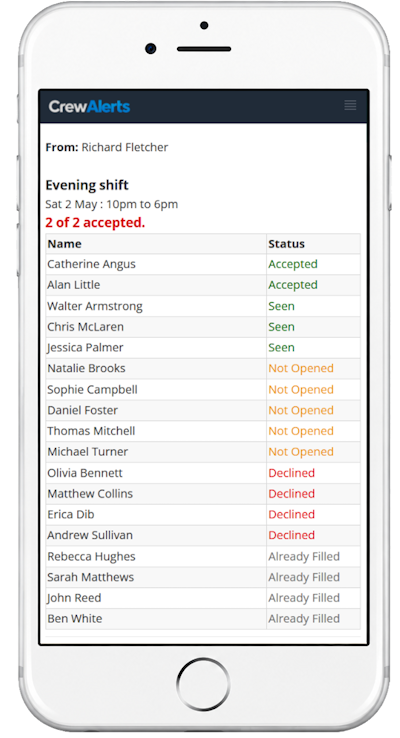
Whether you’re contacting five people or fifty, CrewAlerts keeps everyone’s responses together on one screen for each request.
No credit card required. Free assisted setup. You could be up and running the same day.
No Group Chatter. No Chasing Replies. Just Answers.
CrewAlerts makes it easy to communicate with employees, contractors, casual workers and volunteers without relying on busy WhatsApp groups or individual text messages.
Send a request to the people you choose. They respond privately to you, not the entire group, and you see everyone’s answers together in one place.
Another difference: you don’t get a notification every time someone responds. The answers are collected quietly in the background, ready whenever you want to check them.
Each request has its own results screen, so you always know which responses belong to which request.
Whether you’re filling a shift, confirming an announcement, running a poll or collecting feedback, everything stays organised.
No searching through conversations. No piecing together replies.
You Know the Scenario...
You need two people to cover a shift tomorrow.
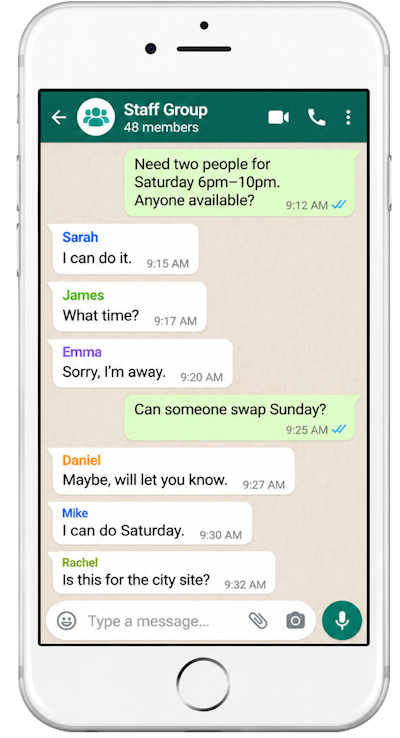
You send a message to your WhatsApp group asking who’s available.
A few people reply. Someone asks a question. Another person starts an unrelated conversation. Before long, your original request is buried under dozens of messages.
Meanwhile, you’re still trying to work out who’s available, who’s confirmed and who hasn’t responded.
And if you’re organising several shifts or activities at once, keeping track of which replies belong to which request becomes even harder.
It’s frustrating, time-consuming and unnecessary.

Imagine If...
You Could Fill Shifts Without Chasing People.
Offer shifts to selected staff, see who's accepted or declined, and limit how many people can accept.
You Could See Who's Read Important Messages.
Send announcements and see who has viewed them, without requiring everyone to reply.
You Could Get Confirmations Without Group Conversations.
Ask your team to acknowledge important instructions or information, and see who's confirmed.
You Could Collect Everyone's Answers in One Place.
Ask a question and see individual written responses together, without sorting through dozens of messages.
You Could Run Polls Without Endless Discussion.
Let your team vote or choose between options, with the results organised for you.
You Could Stop Sending Messages to the Wrong People.
Use tags to reach the right people. For shift offers, exclude staff already rostered or on leave when that information is available.
All of this is possible with CrewAlerts.
Three Simple Steps. All Your Answers Organised.
Target
Choose the right people using tags, then send your request, shift offer, announcement or question.
Respond
Only the selected people are notified. They can respond privately using CrewAlerts.
View
Open the request to see everyone's responses on a single dedicated screen.
Familiar to Use. Different Where It Matters.
CrewAlerts looks and feels like a familiar messaging app.
Your messages and requests appear in an inbox, making it easy to see what’s happening.
But instead of opening a long group conversation, selecting a request opens its own results screen.
See who’s accepted, declined, acknowledged, voted or responded, depending on the request.
And because each request is separate, you can organise several things at once without mixing up the answers.
When you need a private conversation, CrewAlerts also supports direct messaging between managers and individual team members.
See It for Yourself.
Explore the screenshots and see how CrewAlerts works, from sending a request to collecting everyone’s responses.
Ready to Stop the Group Chatter?
Try CrewAlerts with your own team.
We’ll help you import your team, send invitations, and get everyone connected.
No credit card required. Free assisted setup.
Made for Teams That Need Answers.
CrewAlerts is designed for organisations that need to communicate with groups of people and keep their responses organised.

Hospitality & Retail
Find available staff, fill shifts and communicate changes without endless group messages.

Cleaning & Property Services
Contact employees across different sites, organise replacement staff and confirm important instructions.

Event Staffing
Check availability, offer assignments and coordinate casual workers for upcoming events.
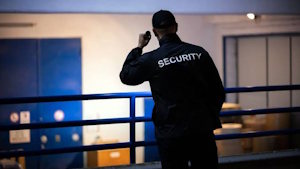
Security Services
Organise shift coverage, communicate operational information and track acknowledgements.

Labour Hire & Casual Workforces
Offer work to selected people, collect responses and keep multiple assignments organised.

Committees & Body Corporates
Collect committee votes, track decisions and see who hasn’t responded, without chasing replies through emails or group messages.

After more than 40 years developing business software, one thing I’ve learned is that the best solutions often make everyday tasks simpler.
When you ask fifty people a question, you shouldn’t have to search through fifty conversations to find the answers. That’s why we created CrewAlerts.
Raymond Davey
Founder, CrewAlerts
Up and Running in a Day. We'll Help You Get There.
CrewAlerts works best when your team is connected and ready to respond.
That’s why we don’t simply give you a login and leave you to figure everything out.
We'll Import Your Team
Already have your employees in MyTimesheets or AceTimesheets? We can import them directly. Otherwise, we'll help import your existing staff list.
We'll Invite Everyone
We'll send the invitations and help employees install and activate CrewAlerts.
We'll Get You Started
Once your team is connected, you can start offering shifts, sending requests and collecting responses.
No complicated setup. No lengthy implementation. You could be up and running the same day.
Frequently Asked Questions
Do employees need to download an app?
CrewAlerts installs directly from a link, without visiting an app store. Employees simply activate their accounts using their invitation details.
How long does setup take?
We’ll help import your team and send invitations. Once employees activate CrewAlerts, you could be up and running the same day.
Can I contact only certain employees?
Yes. Use tags to choose who receives each request. Shift offers can also exclude staff already rostered or on leave when that information is available.
Can employees message each other?
CrewAlerts supports private messaging between managers and individual employees, without uncontrolled group chats or employee-to-employee messaging.
Stop the Chatter. Start Getting Answers.
One request. One screen. Every response organised.
See how CrewAlerts can simplify communication with your team.
Try it free for 14 days, with help getting everyone connected.